Vario 4 Series
no longer available / limited service
Our smallest and lightest braille displays
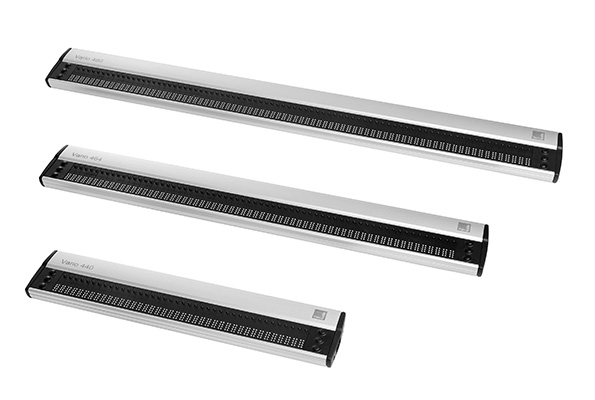
The attractive and easy-to-use Vario 4 braille displays are among the smallest and lightest braille output devices. The 3 models of our Vario 4 family are ideal for both private and professional use. You can choose between 40, 64 or 80 braille cells. All displays of the Vario 4 series are equipped as Human Interface Devices (HID) with a reversible USB Type C connection — you cannot insert the plug incorrectly — making them particularly user-friendly. Vario 4 is limited to the essentials, and is easy and comfortable to use!
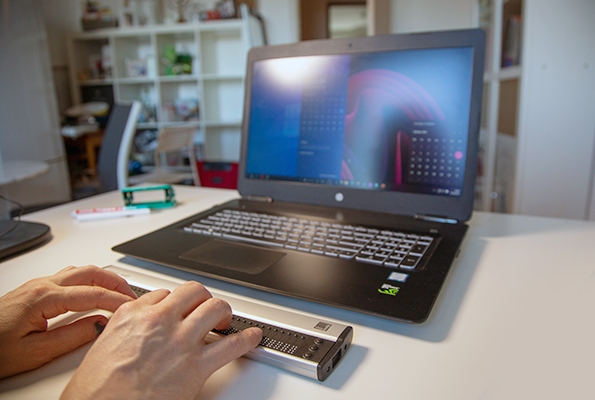
The compact Vario 4 impresses with its simple, functional design, while offering all the typical features of our high-quality braille displays. The 40, 64 or 80 braille cells are embedded in a solid aluminium housing. It is operated using the proven six function keys. Vario 4 is so energy-efficient that it neither requires a battery, nor does it put any noticeable strain on the battery of a connected notebook. The braille display connects easily to a PC or notebook: Vario 4 is simply plugged in and automatically recognised by the operating system. No separate device driver installation is required.
Everything you would expect from a braille display
- compact, lightweight and elegant
- maximum ease of use
- Human Interface Device (HID)
- new USB Type C port
- braille cells with cursor routing
- practical function keys
- sturdy housing and high-quality construction
Upgrade: HID-Braille for your Vario 4
Plug in a braille display and get started right away, with no drivers and no setup: that is exactly what HID Braille stands for, because this new connection standard makes true plug and play possible for braille displays. Developing our new firmware with full HID Braille support was therefore a real milestone, and a step like that deserves a fitting product name and a modern look: so the milestone became a new product, the VarioHID 40.
We decided not to reserve this progress for new devices alone. A good braille display accompanies its user for many years, and over those years it should keep getting better.
That is why we have also developed a new firmware with full HID Braille support for Vario 4 devices, which we are making available to you.
Completely free of charge, with no need to send the device in, and easy to install yourself.
23 September 2026 | Your VisioBraille Team
Technical Data
Features
- 40, 64 or 80 braille cells with integrated cursor routing keys
- 3 function keys left and right of the braille display
Dimensions and Weight
- Vario 440
- 30,1 × 1,7 × 6,0 cm
- 440 g
- Vario 464
- 46,8 × 1,7 × 6,0 cm
- 620 g
- Vario 480
- 57,0 × 1,7 × 6,0 cm
- 760 g
Connectivity
- USB
Compatibility
- via screen reader
Downloads
Firmware, manuals and brochures for the Vario 4 series.
Each file lists its format, size and language so you know what you are getting before you download.
LATEST VERSION
Firmware
Use or VarioUpdater to keep the firmware of your Vario 4 device up to date.
Firmware Vario 4 v2.0
12 August 2026 (ZIP | 31.6 MB)
Updates the firmware of your Vario 440, Vario 464 or Vario 480. Simply download the ZIP and follow the instructions.
For Screenreader
Extensions, configurations and more for smooth operation with different screen readers.
JAWS and NVDA key assignments for the VarioHID protocol
1 October 2026 (ZIP | 619 KB)
JAWS/Fusion up to version 2026 and NVDA do not yet include key assignments, which means that Vario braille displays can connect to the screen reader but cannot be used effectively.
We are therefore making preconfigured key assignments available for download here. Future versions of JAWS will already include these key assignments from the manufacturer (Vispero).
Manuals
The latest manual as well as help with frequently asked questions
Manual Vario 440
Official manual for the Vario 440
12/2023 (PDF |0.53 MB)
Manual Vario 464
Official manual for the Vario 464
12/2023 (PDF |0.53 MB)
Manual Vario 480
Official manual for the Vario 480
12/2023 (PDF |0.53 MB)
Brochures & data sheets
Compact information on features and technical data, for sharing or printing.
Flyer Vario 4 Series
01/2022 (PDF | 0.38 MB)
Compact information on the Vario 4 Series
Our Application Areas

School and education

Profession

Mobile use