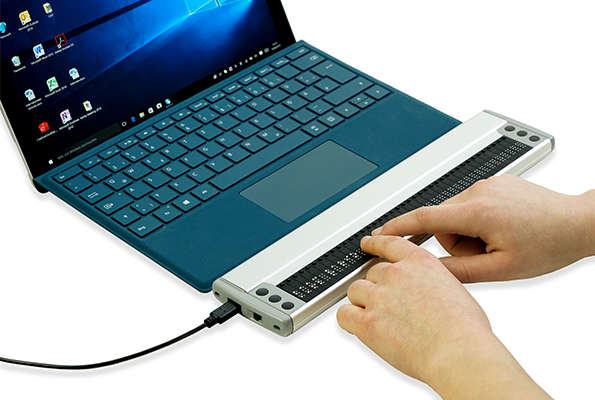
Vario 340
The compact uncomplicated Braille display - just plug in and go.
The elegantly designed and easy-to-use Vario 340 with 40 braille cells is one of the smallest and lightest braille displays available. The Vario 340 is suitable as a compact solution for equipping a home workstation as well as for use in a professional environment. The Vario 340 is HID Braille compatible and comes with a reversible USB Type-C connector – you cannot plug it in the wrong way round – which makes it particularly user-friendly.
The Vario 340 focuses on the essentials, and that is precisely what makes it simple and convenient to use.
Upgrade: HID-Braille for your Vario 340
Plug in a braille display and get started right away, with no drivers and no setup: that is exactly what HID Braille stands for, because this new connection standard makes true plug and play possible for braille displays. Developing our new firmware with full HID Braille support was therefore a real milestone, and a step like that deserves a fitting product name and a modern look: so the milestone became a new product, the VarioHID 40.
We decided not to reserve this progress for new devices alone. A good braille display accompanies its user for many years, and over those years it should keep getting better.
That is why we are also providing new firmware with full HID Braille support for all Vario 340 devices.
Completely free of charge, with no need to send the device in, and easy to install yourself.
23 September 2026 | Your VisioBraille Team
Everything you would expect from a compact braille display
- Simply connect with USB-C
- Ultra-compact and lightweight
- 40 Braille cells with cursor routing
- VarioClassic protocol: VisioBraille-HID compatible
- High quality, robust and elegant housing
- Easy and comfortable to use
- Practical function keys
Technical Specifications
Equipment
- 40 Braille cells with integrated Cursor Routing buttons
- Six function keys; three left and right of the braille display
Compatibility
- all major screenreaders: JAWS, VoiceOver, NVDA, Narrator, BRLTTY
Measurements and Weight
- 30.2 × 2.1 × 7.2 cm
- 11.9 × 0.8 × 2. inches
- 540 g
Connections / interfaces
- USB Typ C
- VarioHID protocol: HID-Braille compatible
- VarioClassic protocol: VisioBraille-HID compatible
Accessories
- Leatherette bag (optional)
Downloads
Firmware, manuals and brochures for the Vario 340
Each file lists its format, size and language so you know what you are getting before you download.
Which drivers and downloads do I need for my screen reader?
Depending on the screen reader you use, different PC drivers, plug-ins or configuration steps may be required.
Last updated 21 September 2026
JAWS
If you want or need to use JAWS with the previously popular VarioClassic-protocol, the JAWS Extension v15.53 is required.
Firmware
Use or VarioUpdater to keep the firmware of your Vario 340 up-to-date.
LATEST VERSION
Firmware Vario 340 v3.0
12 August 2026 (ZIP | 31.6 MB)
Update the firmware of your Vario 340 to v3.0. Simply download the ZIP and follow the instructions.
For Screenreader
Extensions, configurations and more for smooth operation with different screen readers.
JAWS Extension v15.53
May 2026 (ZIP | 2.96 MB)
You only need this JAWS extension if you want or need to use JAWS with the VarioClassic protocol used in the past.
Often referred to as a "JAWS driver", this is not a device driver but a certified JAWS extension that allows connected braille displays to be detected automatically.
The ZIP file contains detailed installation instructions for the extension.
JAWS and NVDA key assignments for the VarioHID protocol
1 October 2026 (ZIP | 619 KB)
JAWS/Fusion up to version 2026 and NVDA do not yet include key assignments, which means that Vario braille displays can connect to the screen reader but cannot be used effectively.
We are therefore making preconfigured key assignments available for download here. Future versions of JAWS will already include these key assignments from the manufacturer (Vispero).
Manuals
The latest manual as well as help with frequently asked questions
Manual Vario 340
Official manual for the Vario 340
19 August 2026 (PDF |0.88 MB)
Brochures & data sheets
Compact information on features and technical data, for sharing or printing.
Flyer Vario 340
10.06.2026 (PDF | 0.6 MB)
Compact information on your VarioHID 40
Our Application Areas

School and education

Profession

Mobile use