VarioUltra 20/40
The mobile Braille display for reading, writing and working independently - compact, lightweight and ready for everyday use.
VarioUltra is our mobile braille display with 20 or 40 braille cells and 8-dot braille input. VarioUltra features a powerful word processor that also supports input and output in contracted braille. VarioUltra can open and edit Word DOC and DOCX files, and display PDF and Excel files. It can connect simultaneously to 4 Bluetooth devices and one USB device. Switching between connected devices is simple and can be done at any time with a single key press — allowing you to work on your PC, tablet and smartphone at the same time. Simply ultra cool!
With USB-C connection
The type C plug is more robust and can be plugged in on both sides. It is smaller and has the decisive advantage of a symmetrical design over previous USB connectors. There is no different top and bottom, so it does not matter which way around you insert the plug. USB-C is backwards compatible — with the help of adapters, older connections can also be used with the new ones.
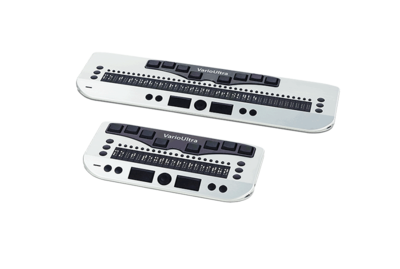

Everything you would expect from a braille display
- available with 20 or 40 Braille cells
- comprehensive built-in functions
- intuitive operation
- Mobile, lightweight and build for all-day use
- Edit Word files directly, view PDF and Excel files
- Connect to up to four Bluetooth devices
- elegant, sturdy housing and high-quality construction
- up to 12 hours of battery life
- multiple navigation keys, Navistick and functions keys
- future-proof and flexible - maximum ease of use
Technical Specifications
Features
- 8-dot braille input keyboard with two ergonomic space bars
- 40 or 20 braille cells with routing keys
- 3 function keys left and right of the braille display
- 4 function keys and a Navistick
Software
- Word processor with contracted braille
- DOCX, DOC, PDF, Excel viewer
- Scientific calculator
- File manager with ZIP packer/unpacker
- Time, date, alarm clock, stopwatch and timer
Compatibility
- PC, MAC and laptop
- iPhone, iPad, Android, GNU/Linux
- Various screen readers
Battery and power
- Built-in Li-ion battery
- USB charger included
- Battery life up to 12 hours (usage-dependent)
Memory
- 256 MB RAM
- 32 GB Flash
Dimensions and Weight VarioUltra 40
- 31.6 × 8.9 × 2.0 cm
- 530 g
Dimensions and Weight VarioUltra 20
- 18.8 × 8.9 × 2.0 cm
- 320 g
Connectivity
- USB
- 4 Bluetooth connections in parallel
Downloads
Firmware, manuals and brochures for the VarioUltra 20 and VarioUltra 40.
Each file lists its format, size and language so you know what you are getting before you download.
Which drivers and downloads do I need for my screen reader?
Depending on the screen reader you use, different PC drivers, plug-ins or configuration steps may be required.
Last updated 21 September 2026
NVDA
NVDA automatically identifies and connects with VarioUltra. No additional downloads are required.
JAWS
For JAWS the JAWS extension v15.53 is required.
Alternatively, the VarioUltra can be used without the JAWS extension via Bluetooth as a VarioConnect , see these instructions.
Firmware
Firmware-Updates and Hotfixes to keetp your device up-to-date.
Last updated 21 September 2026
Latest Version
Update-package firmware v1.42
15 September 2017 (ZIP | 8.4 MB)
This updates the firmware of your VarioUltra to v1.42. User data is preserved.
Reset-package firmware v1.42
15 September 2017 (ZIP | 8.4 MB)
Full reset, deletes all user data and settings. It updates the firmware of your VarioUltra to v1.42.
Important notice
The reset package deletes all user data and settings. Only use it if the standard update does not work.
Instructions for firmware update and reset
15.09.2017 (PDF, 0.6 MB)
Applies to both the update and the reset package
Bluetooth fix for iOS
21.01.2020 (ZIP | 11.5 MB)
Additional update for firmware v1.42; prerequisite: firmware v1.42 fully installed
Fixes connection problems with iOS 11 and later. Braille functionality is reliably available again; HID key simulation and the wake-up function are no longer available, as iOS no longer permits both to be used at the same time.
For Screenreader
Extensions, configurations and more for smooth operation with different screen readers.
JAWS Extension v15.53
May 2026 (ZIP | 2.96 MB)
Extension for JAWS so that VarioUltra devices are detected automatically.
Prerequisites: firmware v1.42 installed; JAWS version 11 or higher
Often referred to as a "JAWS driver", this is not a device driver but a certified JAWS extension that allows connected braille displays to be detected automatically.
The ZIP file contains detailed installation instructions for the extension.
Manuals & Instructions
The latest manual as well as help with frequently asked questions
Manual VarioUltra 20 and VarioUltra 40
11/2025 (PDF |1.6 MB | 199 pages)
The complete reference for your VarioUltra: setup, everyday use, text editing and all key commands.
Audio guide: Bluetooth device pairing
17 April 2024 (MP3 | 29.7 MB)
Step-by-step audio guide on how to pair the VarioUltra with another device via Bluetooth.
Note: The English, French and Dutch versions were created using AI.
Instructions: Bluetooth connection without the JAWS extension
May 2026 (PDF | 0.23 MB)
Instructions for using the VarioUltra via Bluetooth with the VarioConnect driver built into JAWS, instead of the JAWS extension v15.53.
Brochures & Data Sheets
Compact information on features and technical data, for sharing or printing.
VarioUltra flyer
10.06.2026 (PDF | 0.6 MB)
Compact information on the VarioUltra 20 and VarioUltra 40.
Our Application Areas

School and education

Profession

Mobile use